
安装
https://hexo.io/zh-cn/docs/index.html官方文档里教程很完整,照着安装就行
对了有可能会出现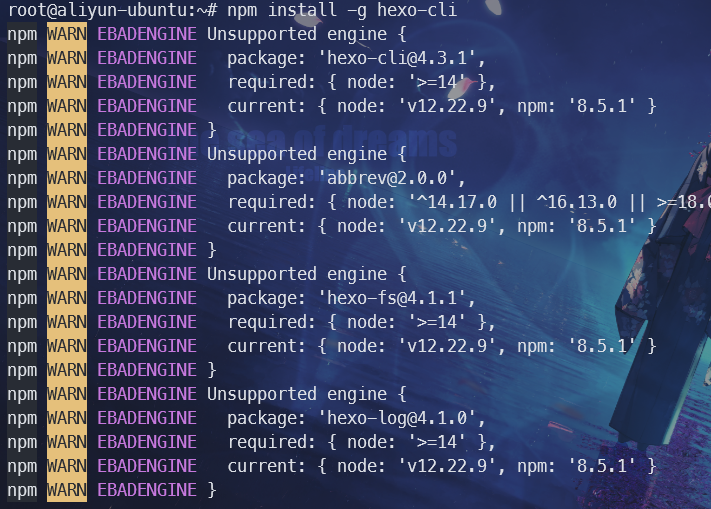
那就是nodejs的版本不够,用nvm安一个新的nvm install 14他会自动安装最新版的14
然后_config.yml文件改一下,这是我的
# Hexo Configuration
## Docs: https://hexo.io/docs/configuration.html
## Source: https://github.com/hexojs/hexo/

# Site
title: GDD's blog
subtitle: Welcome my little world!
description: ''
keywords:
author: GDD
language: zh-CN
timezone: Asia/Shanghai

# URL
## Set your site url here. For example, if you use GitHub Page, set url as 'https://username.github.io/project'
url: https://www.unknown-gdd.xyz
permalink: :year/:month/:day/:title/
permalink_defaults:
pretty_urls:
  trailing_index: true # Set to false to remove trailing 'index.html' from permalinks
  trailing_html: true # Set to false to remove trailing '.html' from permalinks

# Directory
source_dir: source
public_dir: public
tag_dir: tags
archive_dir: archives
category_dir: categories
code_dir: downloads/code
i18n_dir: :lang
skip_render:

# Writing
new_post_name: :title.md # File name of new posts
default_layout: post
titlecase: false # Transform title into titlecase
external_link:
  enable: true # Open external links in new tab
  field: site # Apply to the whole site
  exclude: ''
filename_case: 0
render_drafts: false
post_asset_folder: false
relative_link: true
future: true
highlight:
  enable: false
  line_number: true
  auto_detect: false
  tab_replace: ''
  wrap: true
  hljs: false
prismjs:
  enable: false
  preprocess: true
  line_number: true
  tab_replace: ''

# Home page setting
# path: Root path for your blogs index page. (default = '')
# per_page: Posts displayed per page. (0 = disable pagination)
# order_by: Posts order. (Order by date descending by default)
index_generator:
  path: ''
  per_page: 10
  order_by: -date

# Category & Tag
default_category: uncategorized
category_map:
tag_map:

# Metadata elements
## https://developer.mozilla.org/en-US/docs/Web/HTML/Element/meta
meta_generator: true

# Date / Time format
## Hexo uses Moment.js to parse and display date
## You can customize the date format as defined in
## http://momentjs.com/docs/#/displaying/format/
date_format: YYYY-MM-DD
time_format: HH:mm:ss
## updated_option supports 'mtime', 'date', 'empty'
updated_option: 'mtime'

# Pagination
## Set per_page to 0 to disable pagination
per_page: 10
pagination_dir: page

# Include / Exclude file(s)
## include:/exclude: options only apply to the 'source/' folder
include:
exclude:
ignore:

# Extensions
## Plugins: https://hexo.io/plugins/
## Themes: https://hexo.io/themes/
theme: particlex

# Deployment
## Docs: https://hexo.io/docs/one-command-deployment
deploy:
  # - type: rsync
  #   host: 43.139.55.96
  #   user: root
  #   root: /www/wwwroot/www.unknown-gdd.xyz
  #   port: 22
  #   delete: true
  #   verbose: true
  #   ignore_errors: false

  # - type: git
  #   repo: https://github.com/gdd-04/blog        #你的github.io的网址
  #   branch: master

  - type: copy
    to: /var/www/html
    clean_before: true

toc:
    maxDepth: 3
然后安装一个elognpm install @elog/cli -g具体的官方文档在这https://elog.1874.cool/notion/start
配置好之后弄一个定时任务0 * * * * cd /root/blog&&./tongbu.sh写个.sh脚本就行
elog sync -e .elog.env
hexo g
hexo d